In our previous blog, we’ve listed 11 tips on how to speed up your vivo phone. This instruction covered a wide range of ways to improve your vivo performance by very simple steps.
But when it comes to the internet speed, things are getting tricky as problems may occur beyond the mobile phone itself. That’s why how to boost mobile internet speed is a broad question often asked by Android users.
5 Tricks Before Taking Actions to Increase Mobile Internet Speed
Don’t rush to long technical documents for help, because sometimes things can be way much easier to troubleshoot than we have imagined.
If there is no network and signal, please confirm:
Whether you have turned the airplane mode off Try to restart your phone or turn the flight mode on and off and see whether it connects to the network and gets the signal back.
Whether the SIM card/cards come loose from the card slot Take out the SIM card(s), check if there is any dirt, oxidation or distortion. If so, clean it and put it nicely back to the slot. Change a new SIM card if necessary, and then turn the flight mode on and off to see if it works.
If the cellphone signal is unstable or poor, please check:
Whether your service is suspended due to insufficient balance The carrier card usually comes with a data package with a certain limit. Internet access will be restricted if data usage outnumbers the traffic limit. You can contact the customer service of your carrier to check if your sim card exceeds the limit.
Whether you are in an area with poor signal If you find that your network isn’t working well, you can try to stay in a different location and measure the signal strength.
Whether you are using a magnetic phone case Please confirm whether a magnetic/metal protective phone case or magnetic phone holder is used. If so, get rid of the products made of metal/magnetic materials and try plastic or leather substitutes.
Cards with magnetic chips may interfere with the signal and can cause deterioration of signal and slowing of internet speed.
If the same problem persists, then you can try to follow troubleshooting guide that came with your mobile phone. For vivo users, you may see the instructions below to boost Android Internet speed.
Smartphone Internet Speed Troubleshooting Guide
The internet speed is determined primarily by Wi-Fi network performance and carrier data usage.
How to boost slow data network speed?
1. Upgrade to a 5G smartphone.
Global Telecom has announced that it has launched the 5G in Manila, and it is expecting to roll out its service to more cities in the Philippines. If you reside in the Metro, you must try a smartphone with 5G connectivity.
Downloading a 2-hour movie in a few seconds, 5G mobile network is extremely fast like never before. Deployed with 5G cells, the vivo V20 Pro is the best bet for 2021. V20 Pro is a whole package with everything beyond your expectations: 44MP front camera + 64MP rear camera, 2400×1080 high-resolution screen, powerful battery with fast charging, and more.
2. Turn off data roaming.
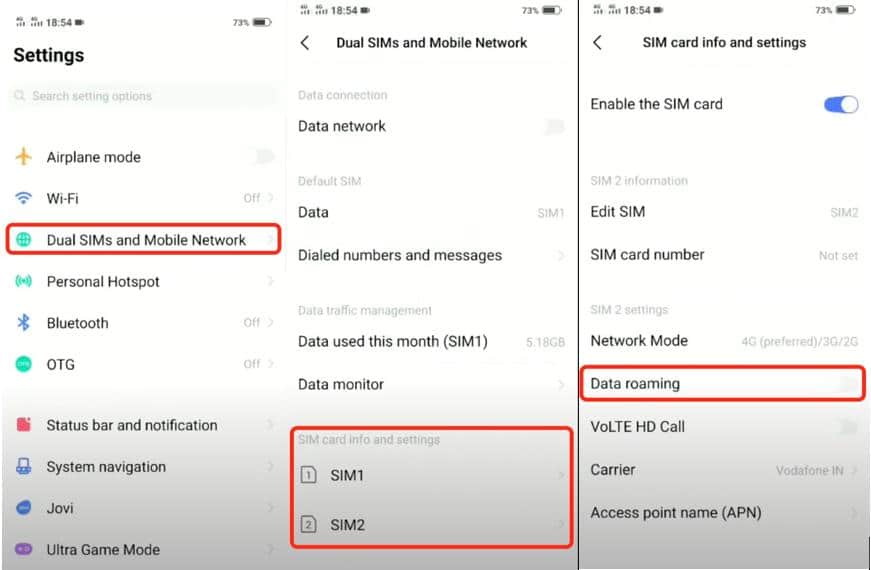
If you happened to turn on the data roaming in your smartphone, it will not only waste your traffic, but slow down the Internet speed.
Take vivo as an example, go to settings > Dual SIMs and Mobile Network > SIM card info and settings, click each of your SIM cards and check SIM settings. Please make sure the “Data roaming” is turned off in gray.
3. Reset APN (Access Point Name)
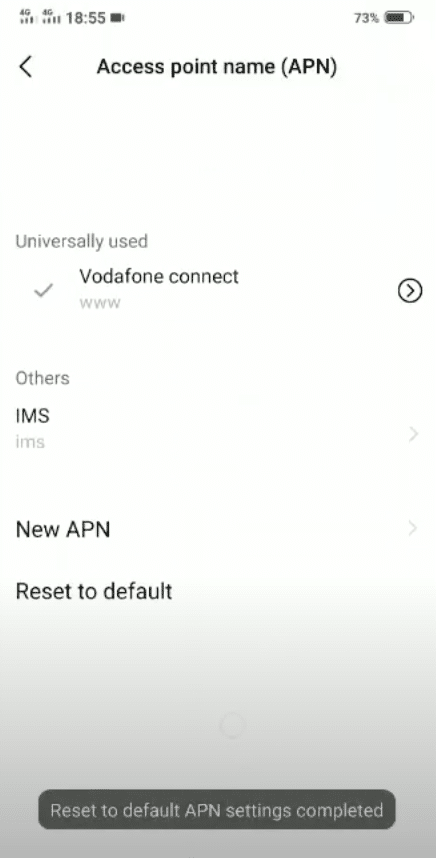
Likewise, under SIM settings you can see the Access point name (APN). Click it and you’ll see an interface like this:
Click on “Reset to default” until you see a notification saying “Reset to default APN settings completed”. Now you can have your smartphone breathe.
4. Expand the memory
It is highly recommended to transfer your local music, games, photos and videos to the extra memory card. With this, it will not only allow your mobile phone to breathe and speed up, but also make data transfer easier from an old vivo phone to a new one.
5. Clear the data and cache of the apps
Enter Settings > More Settings > App manager > touch “More” at the upper right corner > Show system processes > the app > Storage > Clear data. Other Android phones may have similar setting steps.
6. Avoid using your smartphone in the peak hour (9 pm)
According to studies, people are most active on their cellphones at 9 pm. Using smartphones at around 8-10 pm is likely to face a drop in the Internet speed. Better not to surf the Internet with your mobile devices in this period.
How to fix slow Wi-Fi?
Restart the Wi-Fi router and try to reconnect to the Wi-Fi.
Come closer to the router. The signal gets weakened by far distance or physical intervals like a wall.
Reduce the number of users of the home network. Kick out Wi-Fi freeloaders if any. Home networks have limited speed and bandwidth. The Internet speed will slow down with a large number of users.
Buy a new router with higher bandwidth.
One thing you should avoid is using third-party accelerating applications/software to boost Internet speed. You are at high risk of exposing yourself to personal data leakage and vicious attack by malicious groups.
Boosting Internet Speed in Your Mobile
Remember the above 5 tricks before speeding up your Android mobile device, this will save you a lot of time and effort diving into more technical things. In most cases, it is not the smartphone itself that goes wrong. By a few steps of setting, you can troubleshoot Internet speed issues with a snap.
It seems Vivo phones are not good in terms of network…. They only need 4 or 5 G network……. And basically they are very slow when it comes to downloads unlike many many simple phones on the market…. Please improve
There’s no problem with the network.
The problem is vivo phone. Because when I change my sim to another phone it works faster and in this vivo y35 we can’t able ko change AP band
I have the VIVO 1820 and bought this back in the Philippines last 2019 thinking it would be a great phone. However, it is at the time and at a great price. The only issue is the speed that this phone can produce. I have a 1 Gig speed connection and most of the time I get between 700 to 940 Mbps on iPhones and PC’s, including all my Mac’s. It seems the networking hardware for this phone isn’t that at all good. Tried everything to get it up to par, but still can only get up to 40-41 Mbps speed. Maybe there is a software update that can get this phone up to par? Hopefully VIVO can do something about this.
Fair point, Abhishek. If something’s been going in circles for you, drop the model and the exact issue here and I’ll help point you to an actual fix or the right support channel.
Sounds like it didn’t fully live up to it, Alvin, sorry about that. Tell me the model and what’s been happening and I’ll point you to the right fix, or our support team on vivoglobal.ph can dig into it with you.
Sounds like it’s specific to mobile data, Oriakhi. Worth checking your data signal and APN settings, and toggling airplane mode on then off to re-grab the network. If it stays slow off wifi, our support at vivoglobal.ph can look closer.
Slow internet is frustrating, Tuhaise. First things to try: check your network mode and APN settings, and toggle airplane mode to re-grab signal. If your Y-T stays slow while other phones are fine in the same spot, our support at vivoglobal.ph can dig into it.
That’s a useful clue, Abrar, if the same sim is fine in another phone. Worth trying a network settings reset and confirming the right bands and APN are set. If it still lags, please let support at vivoglobal.ph check the unit so they can pinpoint it.
Appreciate the honest take, Richard. Reception can come down to network mode and band settings as much as the area, so those are worth a look. If it’s genuinely weaker than other phones in the same spot, flag it to support at vivoglobal.ph.
Sorry the network’s been a pain, Nilotpal. Checking the network mode and APN settings is the first move, and a settings reset can help. If your handset is clearly weaker than others nearby, support at vivoglobal.ph can take a proper look.













17 thoughts on “How To Boost Internet Speed On Your vivo Phone”
The problem is with VIVO handset; not with any network or otherwise. Please share relevant resolution if you at all have any.
True. Instead of giving solution in the phone they are beating the bushes around. Fully agree with you Mr.Nilotpal Biswas
It seems Vivo phones are not good in terms of network…. They only need 4 or 5 G network……. And basically they are very slow when it comes to downloads unlike many many simple phones on the market…. Please improve
Vivo team you must maintan your Internet speeding
Today is my day 3 returning phones I bought because of Internet problem, please put extra effort on your device in terms of Internet speed
There’s no problem with the network.
The problem is vivo phone. Because when I change my sim to another phone it works faster and in this vivo y35 we can’t able ko change AP band
I have vivo y33t but it’s too slow in terms of internet network,need your help please otherwise things will not be good.
The problem is with vivo handset, if connected to wifi it works well.but it is slow when browsing with sim inside the phone
I have the VIVO 1820 and bought this back in the Philippines last 2019 thinking it would be a great phone. However, it is at the time and at a great price. The only issue is the speed that this phone can produce. I have a 1 Gig speed connection and most of the time I get between 700 to 940 Mbps on iPhones and PC’s, including all my Mac’s. It seems the networking hardware for this phone isn’t that at all good. Tried everything to get it up to par, but still can only get up to 40-41 Mbps speed. Maybe there is a software update that can get this phone up to par? Hopefully VIVO can do something about this.
ddsgsdredgg
Fair point, Abhishek. If something’s been going in circles for you, drop the model and the exact issue here and I’ll help point you to an actual fix or the right support channel.
Sounds like it didn’t fully live up to it, Alvin, sorry about that. Tell me the model and what’s been happening and I’ll point you to the right fix, or our support team on vivoglobal.ph can dig into it with you.
Sounds like it’s specific to mobile data, Oriakhi. Worth checking your data signal and APN settings, and toggling airplane mode on then off to re-grab the network. If it stays slow off wifi, our support at vivoglobal.ph can look closer.
Slow internet is frustrating, Tuhaise. First things to try: check your network mode and APN settings, and toggle airplane mode to re-grab signal. If your Y-T stays slow while other phones are fine in the same spot, our support at vivoglobal.ph can dig into it.
That’s a useful clue, Abrar, if the same sim is fine in another phone. Worth trying a network settings reset and confirming the right bands and APN are set. If it still lags, please let support at vivoglobal.ph check the unit so they can pinpoint it.
Appreciate the honest take, Richard. Reception can come down to network mode and band settings as much as the area, so those are worth a look. If it’s genuinely weaker than other phones in the same spot, flag it to support at vivoglobal.ph.
Sorry the network’s been a pain, Nilotpal. Checking the network mode and APN settings is the first move, and a settings reset can help. If your handset is clearly weaker than others nearby, support at vivoglobal.ph can take a proper look.